Hero Mech Pinball
Hero Mech Pinball was a short project I made with a friend. You play as a mecha pilot fighting a dangerous Kaiju. The twist? Your mech is controlled by a pinball machine! Do pinball combos and unleash your devastating laser beam to save the city!
Hero Mech Pinball is a short self imposed “GameJam” project I did with my friend Kai Oliver. We decided to make a short game during our free time over the course of a month. We split up responsibilities with Kai being in charge of development for the autobattler portion of the game while I worked on the pinball elements. Below I show some parts of the game in more depth.
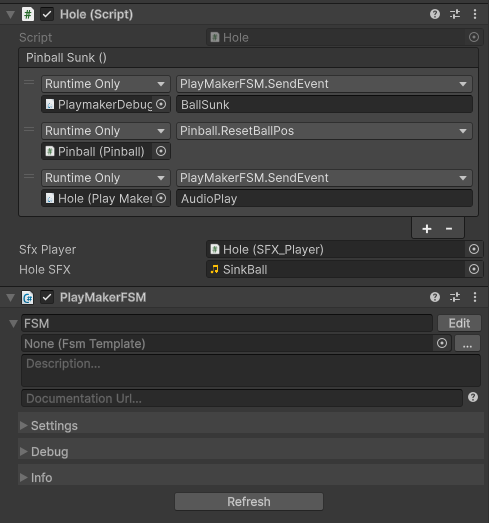
Unity Events
Hero Mech Pinball used two different coding frameworks to implement features. I used Unity’s script system, while my friend used Playmaker visual scripting. We used Unity Events to provide an abstracted and visual way to connect the two systems together.
Tweening
Hero Mech Pinball uses Demigiant’s DoTweening module to add in smooth and programmatically driven animation to the game. This was to add to the game’s feel. A sample snippet of code is included to the left that shows an example of how the code was used.
				private void OnCollisionEnter(Collision collision)
{
    if (collision.gameObject.CompareTag("Ball"))
    {
        //get info
        Rigidbody ballRB = collision.gameObject.GetComponent<Rigidbody>();
        Vector3 contactPoint = collision.GetContact(0).point;

        //determine force direction
        Vector3 normal = (contactPoint - transform.position).normalized;

        ballRB.AddForce(normal * bounceForce, ForceMode.Impulse);

        //feedback on hit
        transform.localScale = originalScale;
        transform.DOPunchScale(Vector3.one * punchScale, punchduration, vibrato, elasticity);
        PlaySFX();

        bumperHit.Invoke();
    }
}
Presentation
Kai and I presented the results of our month long challenge at our local indie dev meetup. Our helpful local archivist also recorded the meeting letting you see it today if you want to.