
Netcode Pong Prototype
Netcode Pong is a prototype I made to tool around with Unity’s “Netcode for Game Objects” functionality. It allows for some basic game functionality and playing with others over LAN (Local Area Network).
Netcode Pong is a solo project I did as part of my “Emerging Technologies” course at NSCC. The idea with this prototype was to familiarize myself with using network functionalities within game engines. I’ve highlighted part of my coding journey with this prototype below.
Connection Handling
I made it that the first step in joining the game is going through the Connection Handler. This manager is responsible for handling connection events and either allowing or rejecting connections. This project used a pier-to-pier architecture with server authoritative logic, making the host handle all network logic.
				    //Method that handles approving a client connection
    private void ApprovalCheck(NetworkManager.ConnectionApprovalRequest request, NetworkManager.ConnectionApprovalResponse response)
    {
        //Set basic response variables
        response.Approved = true;
        response.CreatePlayerObject = true;
        response.PlayerPrefabHash = null;

        if (NetworkManager.Singleton.ConnectedClients.Count >= maxPlayers)
        {
            response.Approved = false;
            response.Reason = "Game is Full";
        }
        else
        {
            //Connection approved, go through spawn logic
            response.Position = GameManager.instance.GetSpawnPoint(playerNum % maxPlayers);
            playerNum++;

            if (playerNum >= maxPlayers -1)
            {
                GameManager.instance.StartGame();
            }
        }

        //finishing response
        response.Pending = false;
    }
Synchronizing Players
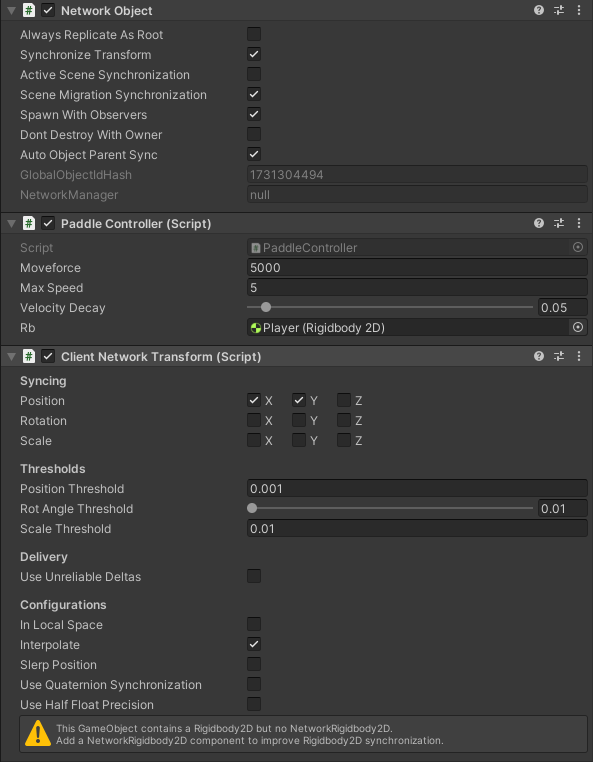
Another hurdle I overcame was synchronizing the movements of objects on two different systems. I did this by using a Network Object to communicate transform information and a Client Network Transform to apply that information on both systems. Similarly the ball also uses these components, but also receives information about it’s current direction for collision checking.
Synching Other Info
There was other information than positions also needs to be synchronized. A good example of this is the score for the Game Manager. These bits of information are communicated using “Network Variables”.
				    [Header("Player Variables")]
    [SerializeField] private Vector3[] playerSpawnPoints;
    [SerializeField] private TextMeshPro[] playerScores;
    private NetworkVariable<int> hostScore = new NetworkVariable<int>(0);
    private NetworkVariable<int> clientScore = new NetworkVariable<int>(0);
    private PaddleController hostController;
    private PaddleController clientController;